


Description
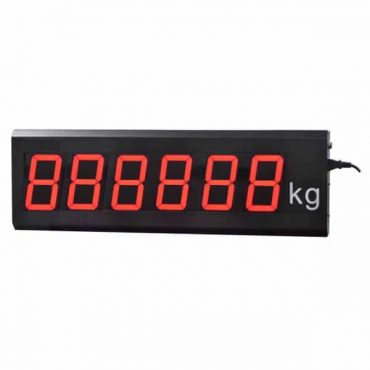
Remote display / scoreboard for weighing systems
Remote displays DPM-P10
DPM-P10 is a 7-inch upgraded remote display for truck scales and industrial weighing systems. The new version keeps the existing layout and icons, supports miniApp configuration, and displays programmable messages up to 900 characters.
| 160 mm Character height | 640 x 160 mm Display area | 680 x 200 x 63 mm Product size | miniApp Mobile setup |
Clear display for weighing sites
The DPM-P10 uses a 7-inch high-brightness matrix LED display for clear long-distance reading. It is suitable for truck scales, weighbridge stations, factories, warehouses, and other industrial weighing sites.
The upgraded version supports setup through a miniApp, making protocol selection, message editing, communication switching, and parameter configuration easier for technicians.
Main functions
| Function | Description |
|---|---|
| Weight display | Displays weighing values from compatible indicators through RS232, RS485, or 20 mA Current Loop. |
| Programmable text | Shows company names, notices, safety messages, or advertising text up to 900 characters. |
| Automatic switching | When the scale stays at ZERO for more than 2 minutes, DPM-P10 can switch to message mode and return to weight mode when weight changes. |
| miniApp setup | Supports easier configuration of protocols, display values, text messages, kg/tonne initial weight, wireless communication, and display parameters. |
Product features
| Feature | Summary |
|---|---|
| Communication | Built-in 20-channel protocol; supports RS232, RS485, Continuous Send, Continuous Receive, and Command Mode. |
| Mobile app control | Android miniApp setup for display value, messages, kg/tonne initial weight, and communication settings. |
| Brightness | High-brightness LED up to 10,000 nits with automatic brightness adjustment and power-saving design. |
| Wireless option | Optional LoRa wireless transmission, open-area range up to 3 km, with repeater support. |
| Data storage | Stores weight data up to 1 year and supports mobile app report export in Excel format. |
 |  |
Indicator compatibility
DPM-P10 has a built-in multi-channel communication protocol and supports common weighing indicator protocols, including Continuous Send, Continuous Receive, Command Mode, CAS, EXCELL, METTLER TOLEDO, FLINTEC, FINE, RINSTRUM, VISHAY, OHAUS, KELI, YAOHUA, MKCELLS, and other compatible systems.
The new version supports RS232, RS485, and 20 mA Current Loop. Wireless communication is optional for long-distance installation conditions.
Communication settings for weighing indicators
KALA DPM-P10 new version usually uses the Yaohua communication protocol by default. #000 is used for FUN00 / Yaohua Current Loop, and #001 is used for Yaohua RS232 mode.
| Indicator model | Version | Wiring | Protocol | Indicator settings | Display settings |
|---|---|---|---|---|---|
| K17S | – | 232 (T & G) | Yaohua | F2.1 = 2, F2.3 = 3 | #v000 and #2.1 |
| Yingzhan | F2.1 = 2, F2.3 = 6 | #v000 and #5.1 | |||
| K27 | – | 232 (Pin 3,5) | Yaohua | F1.5.1 = 2, F1.5.2 = 3 | #v000 and #2.1 |
| 232 (Pin 7,8) | Yingzhan | F1.5.1 = 2, F1.5.2 = 6 | #v000 and #5.1 | ||
| K17 | 1.0 | 232 (Pin 3,5) | Yaohua | F2.1 = 2, F2.3 = 3 | #v000 and #2.1 |
| Q2.0 | 232 (Pin 7,8) | Yaohua | F2.3 = 2, F2.4 = 3 | #v000 and #2.1 | |
| 1.2 | 232 (Pin 7,8) | Yaohua | F2.1 = 2, F2.3 = 3 | #v000 and #2.1 |
For KALA DPM large displays: Red wire = TXD, Black wire = GND.
Firmware versions for domestic and export displays may differ.
Please confirm protocol and wiring before final setup.
DPM-P10 miniApp setup
| 232 communication | Current Loop | 485 communication |
|---|---|---|
| #v000 lowercase “v” | #v110 lowercase “v” | #rs485 |
Engineering data
| Item | Specification |
|---|---|
| Version | 7-inch LED display, Red / Green / White |
| Display function | Weight display and advertising text display |
| Message editing | Change advertising text and send characters via mobile phone / miniApp |
| Font modes | 3 adjustable fonts |
| Character height | 160 mm |
| Display area | 640 x 160 mm |
| Product size | 680 x 200 x 63 mm (L x H x D) |
| Mounting hole distance | 340 mm |
| Connection mode | RS232, RS485, and 20 mA Current Loop; wireless communication optional |
| Communication protocol | Built-in 20-channel communication protocol; supports Continuous Send, Continuous Receive, and Command Mode |
| Baud rate | 600, 1200, 2400, 4800, 9600 bps |
| Brightness | Up to 10,000 nits with automatic brightness adjustment and energy-saving design |
| Wireless option | LoRa spread-spectrum wireless transmission, open area range up to 3 km; repeater support for extended distance |
| Data storage | Stores weight data up to 1 year; supports viewing/exporting recent records and Excel report output via mobile app |
| Standard accessories | 10 m signal cable |
FUN configuration for DPM-P10 new version
Daily setup can be completed through the miniApp. The FUN list below is kept for protocol selection and service configuration.
| FUN code | Protocol / mode | Signal type | Input |
|---|---|---|---|
| FUN 00 | Yaohua large screen | Current Loop | #000 |
| FUN 01 | Yaohua large screen | RS232 | #001 |
| FUN 02 | Hengtian | Current Loop | #002 |
| FUN 03 | Hengtian | RS232 | #003 |
| FUN 04 | Yuhua ASC | COM 9-pin | #004 |
| FUN 05 | Yaohua D2+ | Compatible mode | #005 |
| FUN 06 | Toledo | Compatible mode | #006 |
| FUN 07 | Yaohua A12E | Compatible mode | #007 |
| FUN 08 | Expo | Compatible mode | #008 |
| FUN 09 | Yaohua D2+ 9 bytes | 9-byte data mode | #009 |
| FUN 999 | Universal ASC | Universal ASCII mode | #999 |
Common K8A setup Default 15-pin: COM 9-pin: | Quick switching |
Specifications are subject to change without notice for improvement.
Command line examples
Character string 01: advertising text “CONG TY CO PHAN DAU TU XAY DUNG B.M.T”
Character string 02: advertising text ” www.KalaScale.com Hotline: 0988 708 308″
Setup and demonstration videos
Documents and mobile app
KALA DPM-P10 Remote Display Configuration App – English Version for Android
Need a DPM-P10 remote display?
Contact KALA for model selection, compatibility checking, wiring guidance, miniApp setup, and message programming support.
Kala Weight System
Supplier high end load cell




Reviews
There are no reviews yet.