
Configuring KWS2.7 truck scale software
Download the VP9 runtime.
Download and install the fonts.
Download the Kala Weighing Scale 2.7 software.
At the login screen, enter:
User Name : Admin
Password : qaz
The configuration screen appears. Set the defaults as shown:
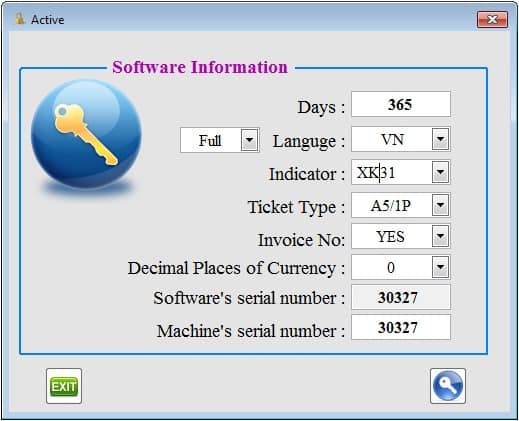
Note : on a screen smaller than 1280*768px, choose Small instead of Full as shown. Then press Active (the key icon).
Initially the program Menu is in English.
The program then has to be closed and reopened. The Menu switches to Vietnamese, but renders with the wrong font.
Fix the Font (Windows 7, 32-bit): right-click the Desktop and choose Personalize. Open Window Color > Advanced appearance settings…
Under Items select Menu, set its Font to VK Sans Serif, then press OK > Save Changes. That is all.
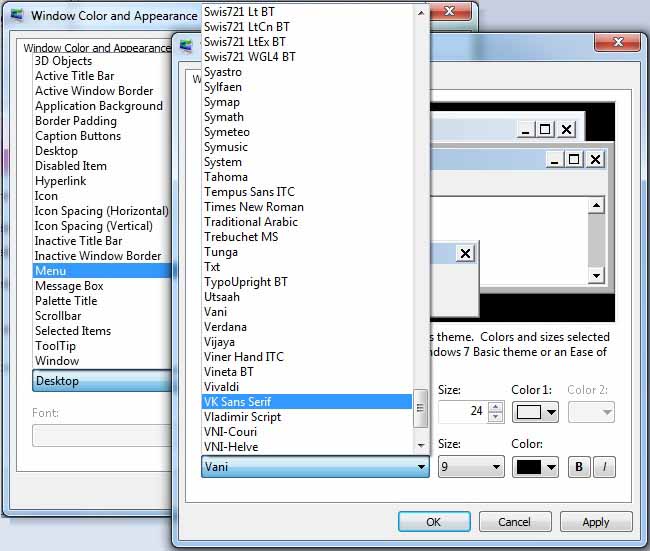
These display areas should have their font changed
Item | Active Title Bar | Menu | Message Box |
Font | VK Sans Serif | VK Sans Serif | VK Sans Serif |
Size | 10 | 10 | 10 |
Back in the program the Menu is now fully in Vietnamese. The Vietnamese input encoding used by KWS2.7 is VNI Windows.
On installation the software offers two indicator string formats, XK31 (XK3190-D10, XK3190-A9+, XK3118K8A, MK-Di01, DS1, DS3, ..) and XK32 (reversed string).